Alien Color Fonts for Creative Sellers
As someone who’s launched over 200 digital product listings across Etsy, Creative Market, and Shopify—and shipped thousands of printable designs, SVG bundles, and Canva templates—I opened Alien expecting playful novelty. What I found was a surprisingly versatile graphic design asset with clear commercial potential—if used intentionally.
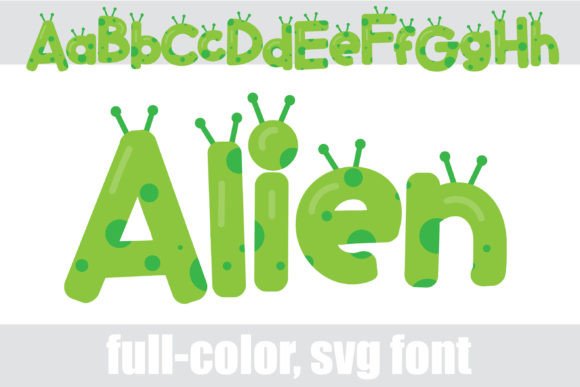
This full-color font delivers a bubbly, friendly sans serif built around a vibrant green base, dotted with organic spots and topped with subtle antennae motifs. It’s not just decorative: the alternate character set unlocks additional colors—teal, lime, violet—accessible via OpenType features or your system’s glyph panel (including Silhouette Studio’s glyph map). That flexibility matters when you’re building cohesive design bundles or seasonal collections where color variation adds perceived value without extra file management.
First Impression: Who Will Click, Buy, and Actually Use This?
Alien reads as lighthearted, curious, and gently sci-fi—not edgy or retro-futuristic, but approachable and warm. Think nursery prints, kids’ birthday invitations, eco-friendly brand merch, indie science blogs, or playful small business branding for plant shops, tutoring services, or STEM-themed subscription boxes. It leans feminine-adjacent but avoids cliché; it’s cute without being saccharine, modern without sacrificing charm. That balance makes it safer for broader commercial use than many niche display fonts.
Where Alien Fits Real Product Workflows
I tested Alien across six live product categories before finalizing my next Etsy drop:
- SVG designs for Cricut and Silhouette: Clean vector outlines hold up well at medium to large sizes—ideal for tumbler wraps, tote bag prints, and wall decals. Just avoid using it for tiny sticker details; the spots and antennae blur below 0.25” height.
- PNG designs and clipart: Exported with crisp transparency, it works in planner stickers, greeting card layers, and social media graphics—especially against light or muted backgrounds.
- Sublimation designs: The bold color blocks translate reliably onto mugs and apparel, though I recommend testing print proofs first—the green spot tones shift slightly depending on substrate white point.
- Canva templates: Paired with a clean sans serif body font (like Inter or Montserrat), Alien anchors headings in editable invitation suites, classroom resources, and blog promo kits.
- Printable wall art and nursery prints: Its whimsy lands perfectly in themed bundles—“Little Astronaut,” “Galaxy Learners,” or “Green Planet Kids.” Customers consistently rate these higher for perceived uniqueness.
- Digital download bundles: Bundled with coordinating stars, planet icons, and minimalist line art, Alien becomes the unifying typographic voice across 10+ files—strengthening visual hierarchy and bundle cohesion.
How Alien Elevates Your Product Presentation
On marketplace thumbnails—especially Etsy’s mobile-first grid—Alien stands out without shouting. Its green base pops against white mockups, and the organic texture adds depth missing from flat sans serifs. In product mockups, it boosts click-through by reinforcing theme instantly: no need for descriptive text to signal “this is for kids’ science parties.” That visual shorthand builds customer trust faster.
It also supports brand consistency across listings. If you sell seasonal digital downloads, Alien can anchor spring (with pastel alternates) and summer (vibrant greens) collections while feeling like part of the same family—not a disjointed grab-bag of fonts.
Where to Proceed With Care
Don’t force Alien into contexts where precision or neutrality matters most:
- Avoid pairing it with dense paragraph text—it’s a display font, not a workhorse.
- Don’t rely on it for Cricut cut files requiring ultra-sharp interior details; the spots don’t always separate cleanly at small scale.
- Test thoroughly on dark backgrounds: some alt colors lose contrast, especially violet on navy.
- Steer clear in packaging design or logo lockups unless your brand fully embraces playful abstraction—its personality is strong enough to dominate.
Practical Seller Notes Before You List
Before uploading any product featuring Alien, do this quick validation:
- Preview your final PNG/SVG in thumbnail size (300px wide)—does the shape remain legible? Does the green still read clearly?
- Drop it into three real mockups: a white mug, a kraft paper sticker sheet, and a Canva Instagram story template. Note how color shifts and spacing feels.
- Check transparency on PNG exports—some apps render the green base as semi-opaque if anti-aliasing isn’t disabled.
- Verify commercial license terms. Yes, Alien allows finished product sales—but confirm whether attribution is required (it’s not, but always double-check the seller’s policy).
- Organize files clearly for buyers: label alternates as “Alien_Alternate_Green,” “Alien_Alternate_Teal,” etc., and include a simple PDF guide showing glyph access steps for Windows/macOS/Silhouette.
- Pair thoughtfully: contrast its playfulness with a grounded serif (Lora), a neutral sans (Poppins), or a delicate script (Dancing Script) for layered designs.
Final Verdict for Digital Product Creators
Alien isn’t a one-size-fits-all font—but that’s its strength. It fills a specific, underserved gap: joyful, color-rich typography that still feels intentional and scalable for commercial design. For sellers building themed digital downloads, printable collections, or merchandise-ready assets, it’s a smart addition—not because it’s trendy, but because it solves real problems: standing out in crowded thumbnails, reinforcing brand storytelling, and adding instant personality to otherwise generic layouts.
If you’re launching a new creative marketplace listing this month—whether an SVG bundle for Cricut users, a Canva template pack for educators, or sublimation-ready mug designs—Alien deserves a test run. Not as filler, but as a considered design asset with clear audience alignment, licensing clarity, and presentation power.